worked on k1 SE aswell. i had an extra issue caused maybe when i install helper_script ,i think, because i had black camera asweel. And after install option 17, camera control settings. And i could modify the camera config script to boot with diferent brighness saturation etc… on fluidd and now it’s good. by default helper script do a reset to minimal parameters on camera. minimum brighness,gama etc,so black camera image. NOW THAT PRINTER WON’T DO UPDATES EVER AGAIN!!!
Did some trouble shooting with Claude Code  . I could have asked it to create a script like others have done, but I figured people like to know what they’re doing so I preferred the step by step explanation (like the steps I did) rather that blindly trusting someones script
I made the mistake of upgrading the firmware to 1.3.5.22 after being prompted to do so every time I turned my K1 on, even though my K1 doesn’t have a camera. After sending a new print job from Creality Print, the printer continuously tries to access a camera, without success 
so disable it on printer >“camera menu. that one is the easy part
Thank you for this writeup! Followed the steps and camera is now accessible through Fluidd again! However, I’m now getting “unknown exception” errors every time I start the printer, and when I paused a print the printer failed to re-heat the nozzle when restarting, again throwing the unknown exception (this may be unrelated though). Any clue what may be causing this?
My K1C not modified has the same problem
Follow up, I downgraded to 1.3.3.46 and I can see the camera again in orca slicer.
In my case on a k1c unrooted the camera stopped working in orca slicer after upgrade to firmware 1.3.5.22, the camera does work through creality print, so it is 100% something on software. may be they changed the port?
same thing on my k1c, reverting to older firmware solved it.
Hello, i have the same problem. Black screen! How do you manage to modify the camera config script to have different brightness and saturation?
Thanks!!
Nice work: “We are very sorry for the unclear explanation earlier. The firmware update has optimized the camera secure stream, and this mechanism will be kept in all subsequent firmware versions. If you need to use the camera function, you will need to downgrade the firmware. Thank you for your understanding.”
It’s honestly embarrassing how Creality handles support. They launch all these models and gadgets, but support is practically nonexistent. You can’t rely on getting updates, and the community ends up fixing 90% of the issues anyway. It’s pretty sad.
What’s even the point of having forums if they’re never gonna reply or listen the comunity? It makes zero sense. 
i had to install fluidd to solve the issue,even if i don’t want make root.creality oblies me to solve the problem caused by this firmware update. i don’t care if it’s NEW DRIVER policy and security . was not what was done when i bought the machine and it’s not what comunity wants and it’s not even a security feature because i don’t need to secure my 3d job from my internal network. SO next printer will be an BAMBU for sure!!
how i solve the camera blackscreen picture ? i had to ask help to gemini to find the camera script on fluidd file manager ,then i had to ask it to write a new script with the parmeters that my camera use at default values ,and then ajust brighness and finally you need to save the changes to be permanent . Sorry to no be very specific but i did it on the run with Ai help and it worked
1 Like
Hello!
Thank you for your help!
When i want to modify parameters for the camera in fluidd (exposure for example), i have this problem:

v421-ctl seems to be missing.
An idea?
unknown control…. it’s unknown ,your camera don’t use this paramters. my advise it’s copy and pste the scripst and error logs to AI .it will help better than me
Confirm it works also on K1 Max
Same issue with the K1SE, went back to the prior firmware. Was hoping this has been solved by now. That was like two weeks ago.
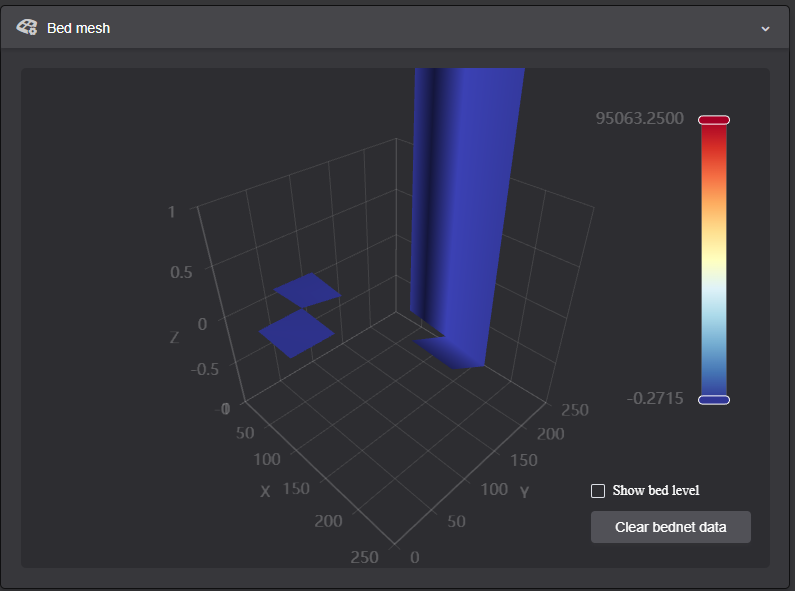
In my case not only the camera stopped working, also had the weird bedmesh and could also not see the files on the printer. Solved by rolling back the firmware version to V1.3.3.46.
Downloaded the img file from Flagship Series Firmware Download | Creality 3D Printer Firmwares
Copied to a FAT32 formatted USB stick. Read some help somewhere that it should be the only file in the root directory on the USB file. I just moved my gcode files to a subdirectory and left the img file in the root directory.
Plugged it into the printer which was on and it popped up with a message saying there was a new firmware version and did I want to update, said Yes. It installed the old firmware and rebooted. Of course it picked up that there is a new firmware version available v1.3.5.22 but just declined the update.
All is back to normal, camera and files are visible again and able to trigger prints from OrcaSlicer again. proper bedmesh has also been restored.