Ok, I think I follow. I guess what I should say that what I am seeing is the “start” screen, with the four boxes… “print”, “prepare” “control” and “leveling”. It sounds like you wouldn’t expect that, but your changes do modify the display to where it isn’t the same as the stock display view. that wouldnt bother me, I was just hoping to see something other than those 4 standard boxes/options if its printing nothing.
There is some docs on github on the display, which have been reverse engineered:
There is also a kipper project that uses this to make use of the display:
Haven’t ever looked at these, except for starring the projects for possible future use
Yes I want that too, but without accessing the SRAM of the LCD or designing a new firmware for the LCD (which is not in my path right now)I can’t add custom logos or images. I was thinking after the serial port is connected to show an Octoprint logo or so; but haven’t had lucky so far. So for now we just see the weird ASCII octopus (yep I know we need a lot of imagination to see an octopus) and the message that is connected in the title bar.
ah, OK, maybe I did in fact misunderstand. So you also only see those standard 4 boxes while printing?
All the “info” you were saying you now see is only visible within Octoprint’s UI, and NOT the LCD screen?
Thanks for the links I saw all the documents around internet of the LCD, those, in reddit, asked in the Forum of the American clones of that LCD, also in the discussion of the mriscoc professional firmware but all have the same conclusion, the docs around doesn’t cover the real instruction set of our LCD. For example the QR generation and the SRAM access doesn’t work.
I created a firmware where I send the hex values through octoprint serial terminal to see all the available images and icons but that’s it. I Also found stores in Ali express with the model of our LCD but I cancel the purchase because the way it is accessed is way too different that creality one.
I just got the serial adapter to start playing with python and the LCD just haven’t had time to do testing due to job, queued prints, holidays, and now I’m Thinking about multicolor… But suddenly many bugs appeared with the firmware and needed to fix those before trying anything else.
Hopefully soon I can get some results and if not, well, no thumbnail in our screens. I remember to see a comment in the original firmware that they dropped the preview since is not supported due to limitations. Hopefully aren’t hardware limitations and just code.
No, I do see the progress while printing.
Did you installed the Octoprint Plugin too?
Check the readme in the GitHub to get access to the Octoprint plugin that enables the communication between Octoprint and the printer to render in the LCD.
Yea, I thought I did… but maybe I didn’t do that right? Here is what I see in the plugin manager in Octoprint:
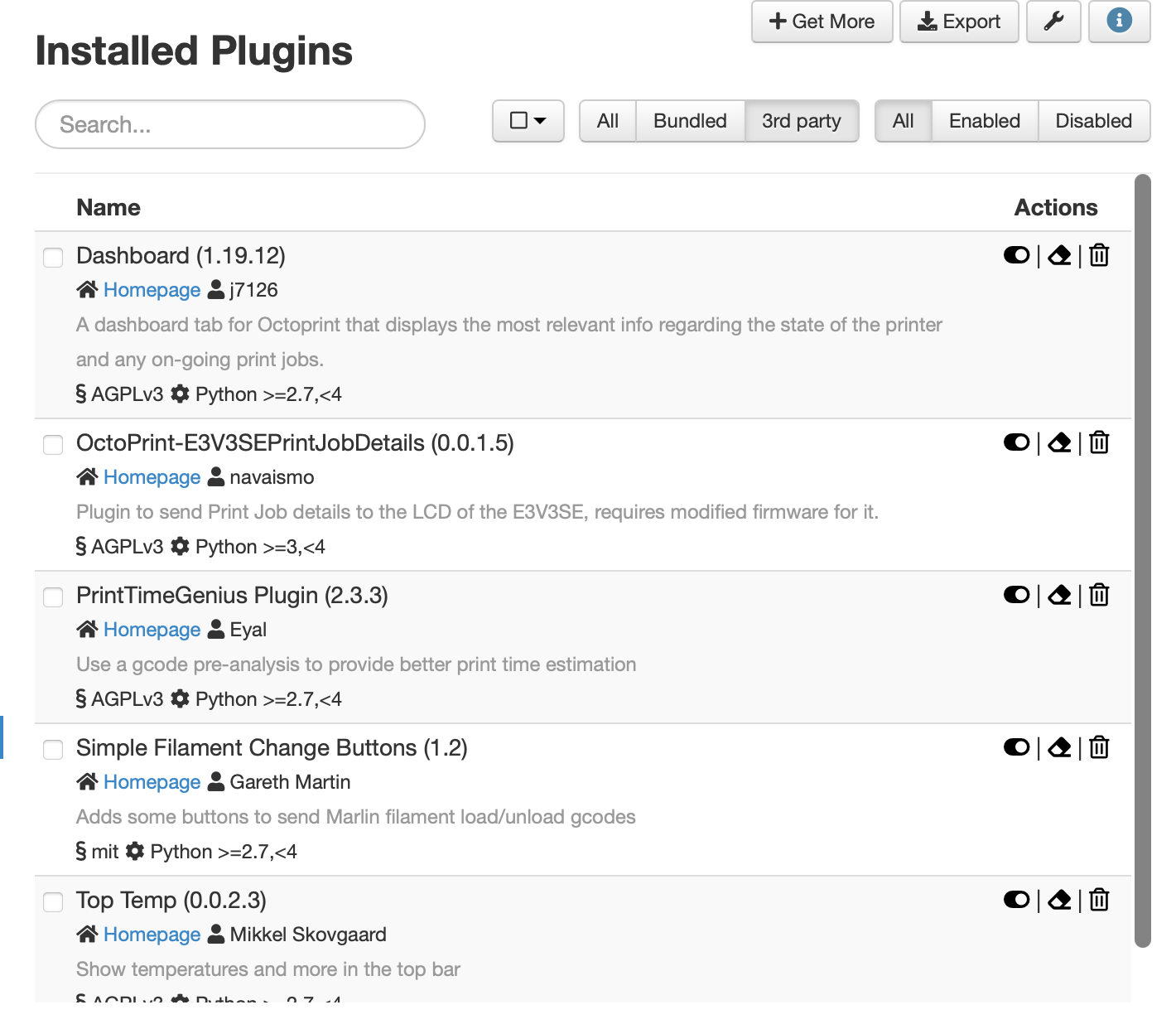
And what about the configuration of the plugin?
Are O9000 commands enabled?
And Progress configured too?
ohhhh shoot. I do think I forgot those parts. Let me try that. to be clear, its just the two screenshots of the 09000 OCON| and the other?
Yes, you need to enable the O9000 Command:

And with the latest firmware update, you need to add the serial commands too:
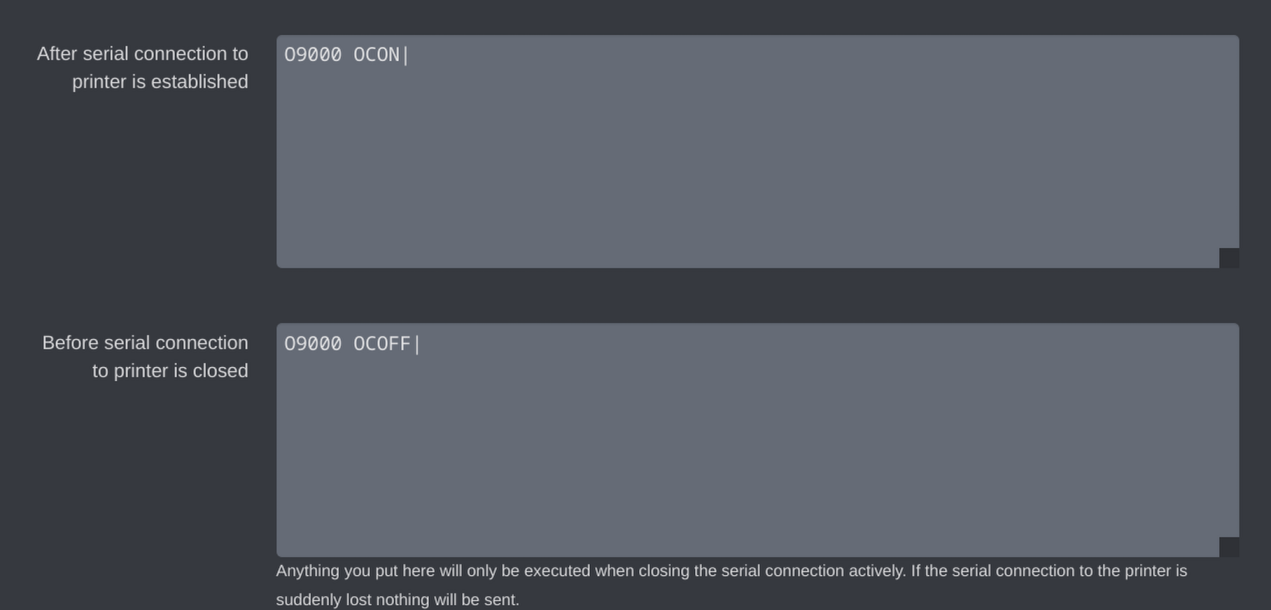
The Gcode scripts are recommended too, or at least send the M117 after cancelling to clear screens. I’ll work later to have a cancel screen with an O9000 cmd.
Fantastic! This was completely what I had missed. I am all set now, thank you and sorry for the dumb missing of steps.
Wonderful work here on this entire thread by all committers. Perhaps I can figure out how to help at some point (I am also a software dev, but very new to 3d printing)
Hi @Iroh3d
Have been doing the colour changes now that the purge works, however can I make a suggestion for the next firmware update.
Can you set the purge to push out perhaps 50mm…currently it only purges a couple or 3mm and you have to repeatedly press the purge button 10 or 20 times to get enough filament through for the colour change to be effective. When doing an extrude from the Ender screen it appears to push out 80 to 90mm at a faster speed to what Octo is doing to really get that old colour out.
If it was set at 50mm it should probably get it through in that first purge and if not, another purge wouldnt do any harm if it was needed.
hey @Iroh3d i am curious if I am seeing a weird printing thing or just bad models… i’ve had 3 prints so far where the top 8 layers or so are just offset (all are about 1-1.5mm offset) from the rest of the model walls. im not really sure what could explain that… will be trying a few more prints that I previously printed today to see if i can isolate it to the model or possibly the firmware?
its not like its leaning, its just not even. once it starts that offset, it continues to build layers at that “position”.
has anyone else seen this?
For Octoprint Purge is the Creality’s default value. For LCD knob since is just one time I set it to 20 if I recall.
I can increase for octoprint too raising the default value of purge extrusion.
No, my prints are working BAU.
But you need to keep in mind two things:
- First: the grid is changed to 5x5 so it’s recommended to do a reset an recalibrate the grid and the Z offset of your printer.
- Second: The modification of the software are only to Enable, LCD information, M600 extrusion, pause and position. Queuep’s user enabled Linear advance but I haven’t configured not tested on mine that so I keep normal values from slicer. And the Hosts commands along runout sensor has been enabled by Rtorchia & Tomasek GitHub users.
Sending LCD commands will affect your print in terms of milliseconds pauses that’s why I have raised the serial Buffers and the baud rate to 128000 to avoid unnecessary oozing of the nozzle when the plugin send the information. I don’t have any idea of how many users are using this but from my experience the GCODE of my prints aren’t being affected by the O9000 cmds.
Also the oozing can be reduced by lowering the material temperature 1° or 2° usually people goes full >210 while most of pla start melting at 190.
So in general the firmware hasn’t been modified to affect factory movements while printing.
Hi @Iroh3d
The LCD knob purge I am referring to is the one that can only be done before a print is started, it also raises the nozzle temp to 240 degrees it is here that 90mm of filament is extruded.
During a colour change that is set in the Gcode, the purge on the Octo only appears to move 2 to 3 mm of filament which is a very short amount, so if that is the creality default purge amount it is very lacking.
50mm is a better amount to be extruded, and at least, if some colour is remaining, a second purge would take care of that.
yea, I have done the recalibrate (auto-level) from the LCD panel since flashing, and saw the new grid. I did that again today per your suggestion and we’ll see how it goes.
the rest of your post is just clarifying the other changes correct, or was there something else i was needing to check or do?
thanks for the help here and sorry for the dumb questions.
Don’t worry about the questions we are here to help each other. I’m not an expert I have 1 year and a month with my E3V3SE and the last two months started to edit the firmware because I wanted to see the progress in the LCD while using Octoprint so the firmware for sure is not perfect and as you can follow in this thread bugs appeared mostly because the firmware was designed to work standalone and now that we enabled the Hosts commands some flows are being affected and I’m trying to fixing it while adding some features too.
So please don’t hesitate to report bugs, suggestions or PR in the GitHub repo or ask here.
1 Like
so i guess the proper term after some googling of what im seeing is “layer shifting”. its not consistent, but i have a print now that just continues to have it happen. it was a downloaded STL file, that was in 3 parts, which tinkered and broke into 3 separate files. 2 of the individual parts were fine, but one of them has done this 3 times now.
i am running the “b” firmware. should i just try rolling back to one of your prior builds? i dont see anything in the cura sliced visualization at least…
“B” only has more verbosing while performing a pause or M600 command in case of an issue. The rest is the same as the prevoius one.
Layer shift are usualy related to the belts or drastic temp changes; I cannot tell what exactly to look since I have never had one in this whole year.
If possible you can share the stl of the piece with the issue and I can try to reproduce the issue here to see if something related with the updates of the LCD.