Well, add me to the list of experiencing this woe. I bought V3 last week, made a few prints, and the card quit working. I reformatted it, that worked for two days, then the reader on the printer stopped again. Card works in computer. Formatted again, 8gb, as suggested above. Must be the motherboard. Not thrilled to go through an exchange process or repair. Since it is less than 7 days old, speed is a bit slow, and I really wish this had wireless printing, I may return it. Would love to have suggestions on what you would upgrade to. I wanted a starter printer, nothing fancy. Thanks.
Merhaba Bende işe yarayan bir yöntemi paylaşıyorum
1- sdcard tı formatlayın ( ben 32gb kart kullanıyorum Ayırma birimi boyutu (varsayılan)
2- G-code sdkarta aktarın
3- sdcard bilgisayardan direk çıkarmayın bu adımı izleyin ( sdcard sağ tuş ÇIKAR) bu şekilde çıkarın
4-3d yazıcınız açık ve ekran sd kard menüde iken sd card yazıcızı yuvarsına yavaş yavaş itin
umarım işinize yarar
So I’m having the same issue, putting the card in the printer and it shows nothing I have saved. When I put the card in my pc it now says windows doesn’t recognize it and I can’t even reformat it
I had this issue too, I formatted the card on my computer and tried again and then it worked. Looks like its an SD card issue
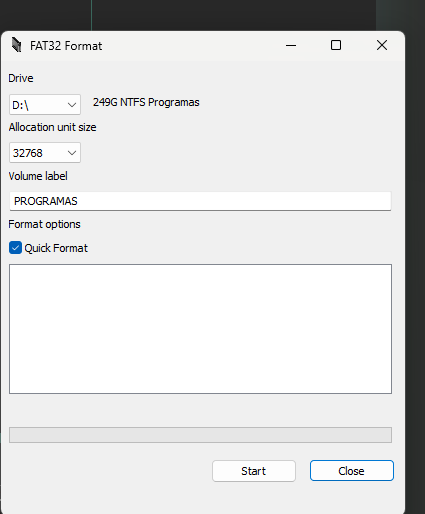
LO LOGRE, utilicen este y conviertan la memoria a fat 32 y si la tienen de igual haganlo esa es la solucion el de windows no se que tiene pero con esto me funciono
AQUI TODOS TENEMOS EL MISMO PROBLEMA
Same Here
MY SD Card Slot broke(Keep Ejecting CARD),
so
I Created an app to Print your G-Code Using USB-C
Try it, Unofficial App
Easier than Using UltiMaker,
Just plugin your Printer Usig USB-C Port
Run the app and chose Your Gcode Creted with Creality Print
I Designed this app FOR Creality Ender V3 SE so Most of the Function is controlable from this app Including Print Speed, Nozle Temp
Hope every one likes it
YAOYOROZU LAZY PRINT
https://drive.google.com/file/d/1p4RxRhKKle5l7hfej7RZbN4RnMj_viHs/view?usp=drive_link
Step 3 finally got the card working for me